Author: Veride Luxe

  • How to Spot AI-Assisted Answers in Remote Interviews

    How to Spot AI-Assisted Answers in Remote Interviews

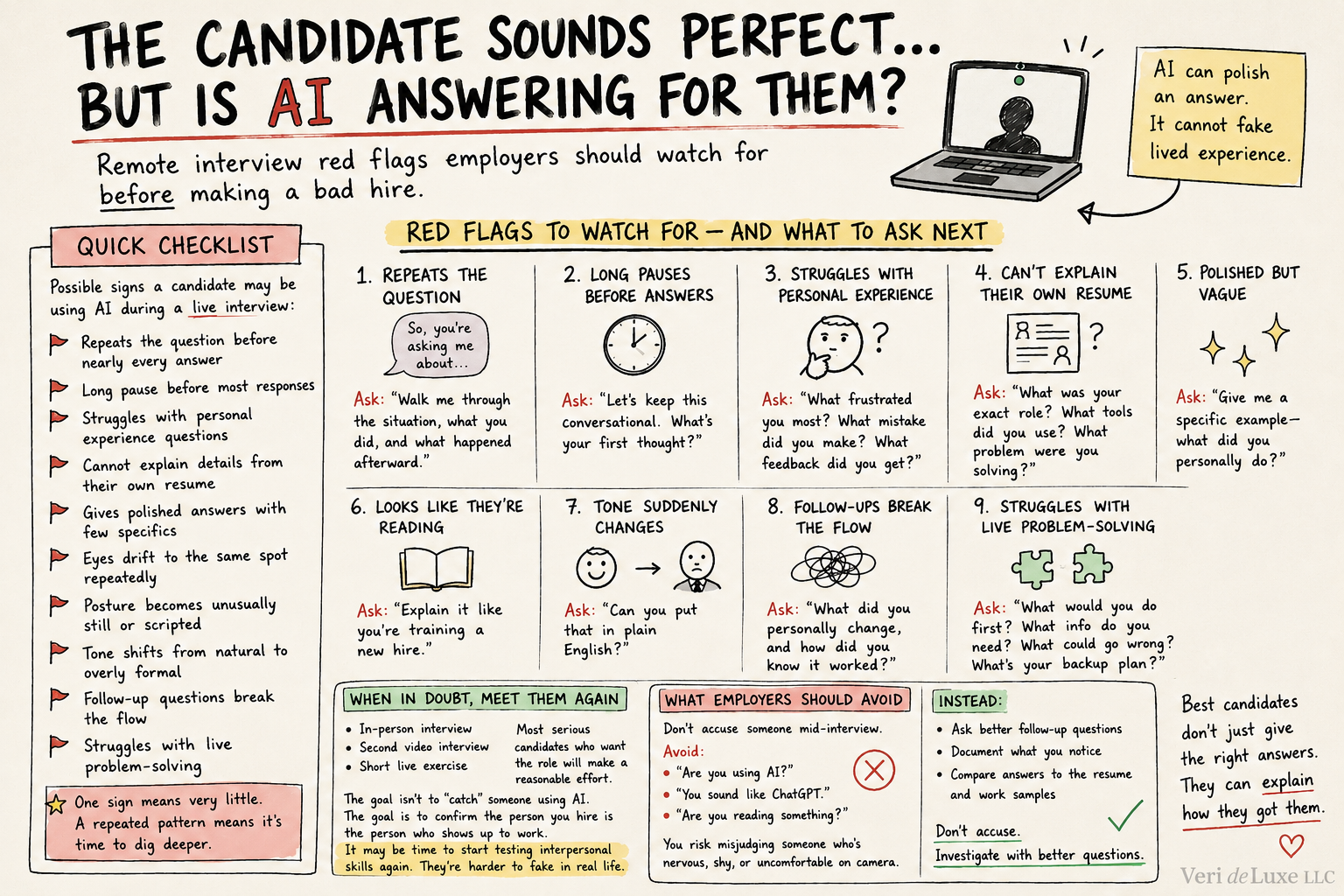
    The Candidate Sounds Perfect… But Is AI Answering for Them?

    Remote interviews are great for convenience — and unfortunately, great for candidates who lean on AI tools during the conversation.

    This isn’t about preparing with AI. Researching the company, practicing answers, or polishing a resume is normal.

    The concern is real-time AI assistance — when the candidate is quietly feeding your questions into a tool and reading back the output.

    AI can polish an answer.
    It cannot fake lived experience.

    As AI tools become more common, employers may need to adjust how they evaluate candidates in remote settings.


    One Sign Means Nothing. A Pattern Means Ask Better Questions.

    A pause, a glance away, or a stiff answer doesn’t mean someone is cheating.

    People get nervous. Some are introverted. Some are neurodivergent. Some are speaking a second language.

    The issue is patterns — when polished answers crumble the moment you ask for specifics.

    Quick Employer Checklist

    Possible signs a candidate may be using AI during a live interview:

    • Repeats the question before nearly every answer
    • Long pause before most responses
    • Struggles with personal experience questions
    • Cannot explain details from their own resume
    • Gives polished answers with few specifics
    • Eyes drift to the same spot repeatedly
    • Posture becomes unusually still or scripted
    • Tone shifts from natural to overly formal
    • Follow-up questions break the flow
    • Struggles with live problem-solving

    One sign means very little.
    A repeated pattern means it’s time to dig deeper.

    Red Flags to Watch For — And What to Ask Next

    1. They Repeat the Question Before Answering

    What it looks like:
    They echo the question almost word for word.

    Why it matters:
    It can buy time for an AI tool to generate a response.

    What to ask next:
    “Walk me through the situation, what you did, and what happened afterward.”

    2. Long Pauses Before Most Answers

    What it looks like:
    Several seconds of silence before nearly every response.

    Why it matters:
    Delays can come from transcription tools or hidden prompts.

    What to ask next:
    “Let’s keep this conversational. What’s your first thought?”

    3. They Struggle With Personal Experience

    What it looks like:
    Strong general answers, weak personal ones.

    Why it matters:
    AI can fake a concept. It can’t recall their career.

    What to ask next:

    • What frustrated you most?
    • What mistake did you make?
    • What feedback did you get?
    • What would you do differently now?

    4. They Can’t Explain Their Own Resume

    What it looks like:
    They listed a skill or project but can’t explain it clearly.

    Why it matters:
    If it’s on the resume, they should be able to talk about it.

    What to ask next:

    • What was your exact role?
    • What tools did you use?
    • Who else was involved?
    • What problem were you solving?
    • What changed because of your work?

    5. Answers Sound Polished but Vague

    What it looks like:
    Professional tone, zero specifics.

    Why it matters:
    AI answers often sound smooth but empty.

    What to ask next:
    “Give me a specific example — what did you personally do?”

    6. They Look Like They’re Reading

    What it looks like:
    Eyes flick to the same spot, posture stiffens, rhythm becomes “read aloud.”

    Why it matters:
    They may be reading AI-generated text.

    What to ask next:
    “Explain it like you’re training a new hire.”

    7. Their Tone Suddenly Changes

    What it looks like:
    Natural small talk turns into a corporate script once the interview starts.

    Why it matters:
    A sudden shift can signal they’re no longer speaking freely.

    What to ask next:
    “Can you put that in plain English?”

    8. Follow-Up Questions Break the Flow

    What it looks like:
    Strong first answer, weak details.

    Why it matters:
    AI can give a headline. It can’t give the story.

    What to ask next:
    “What did you personally change, and how did you know it worked?”

    9. They Struggle With Live Problem-Solving

    What it looks like:
    Great with rehearsed questions, shaky with real scenarios.

    Why it matters:
    Live thinking is harder to fake.

    What to ask next:

    • What would you do first?
    • What information do you need?
    • What could go wrong?
    • What’s your backup plan?

    When in Doubt, Meet the Candidate Again

    If something feels off but you still like the candidate, invite them to:

    • an in-person interview
    • a second video interview
    • a short live exercise

    Most serious candidates who want the role will make a reasonable effort.

    The goal isn’t to “catch” someone using AI.

    The goal is to confirm the person you hire is the person who shows up to work.

    It may also be time to start testing interpersonal skills again. Communication, adaptability, confidence, and real-time problem-solving are harder to fake when the conversation becomes more natural.


    What Employers Should Avoid

    Don’t accuse someone mid-interview.

    Avoid:

    • “Are you using AI?”
    • “You sound like ChatGPT.”
    • “Are you reading something?”

    You risk misjudging someone who’s simply nervous, shy, or uncomfortable on camera.

    Instead:

    • ask better follow-up questions
    • document what you notice
    • compare answers to the resume and work samples

    Don’t accuse.
    Investigate with better questions.


    Final Thoughts

    AI is changing hiring — especially remote hiring.

    Employers don’t need to become suspicious.

    They need to become better interviewers.

    Ask specific questions. Listen for real details. Use scenarios. Push past buzzwords. Make sure the candidate can explain the experience they claim.

    AI can help someone prepare.
    It shouldn’t be the one doing the talking.

    The best candidates don’t just give the right answers.
    They can explain how they got them.

  • Upgrade Your Affiliate Content: 7 Strategic AI Prompts

    Upgrade Your Affiliate Content: 7 Strategic AI Prompts

    7 AI Prompts for Affiliate Marketing Success

    Copy-and-paste prompts to find better affiliate cocntent ideas, improve old posts, discover affiliate programs, and focus on revenue instead of random traffic.

    Affiliate marketing gets messy fast. One minute you are writing a product roundup, and the next you are buried in keywords, Amazon links, Pinterest ideas, and advice that sounds helpful but does not lead to clicks.

    The problem is not always finding products. The problem is figuring out which content ideas are worth your time, which products fit naturally, and which articles have a real chance of turning into clicks, conversions, email signups, or revenue.

    That is where better AI prompts can help.

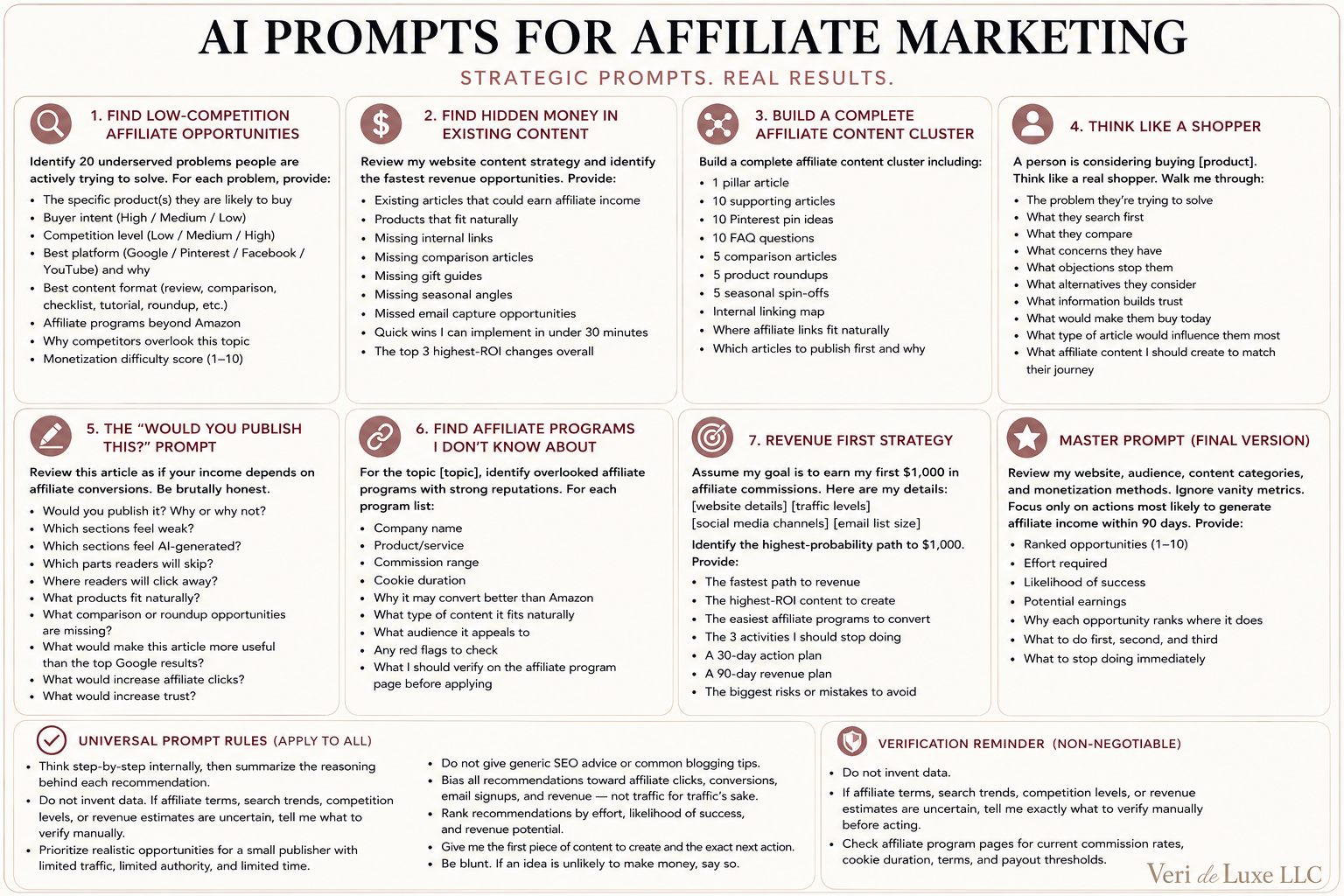
    Affiliate Marketing AI Prompt Cheat Sheet

    Save this prompt card for later, pin it to Pinterest, or bookmark this page so you always have the prompts handy.

    AI prompts for affiliate marketing success cheat sheet with seven prompt ideas for finding affiliate opportunities, improving content, building content clusters, thinking like a shopper, finding affiliate programs, and creating a revenue-first strategy.

    Prefer to copy and paste?
    The full text version of every prompt is included below so you can customize them for your niche, audience, website, and affiliate programs.

    Who These Affiliate Marketing Prompts Are For

    • Bloggers trying to monetize existing content
    • Pinterest creators looking for affiliate content ideas
    • Amazon Associates members who want more than random product links
    • Small publishers with limited traffic and limited time
    • Content creators building niche websites
    • Anyone trying to earn their first affiliate commissions

    Why Better AI Prompts Matter for Affiliate Marketing

    Generic prompts usually give generic answers. If you ask AI to “give me affiliate marketing ideas,” you may get the same recycled suggestions everyone else gets: write product reviews, make gift guides, post on Pinterest, and create high-quality content.

    That is not enough.

    Good affiliate content needs to connect three things:

    A real problem
    What is the reader trying to solve?
    A natural product fit
    What would genuinely help?
    A revenue path
    What could lead to clicks, trust, or sales?

    Copy-and-Paste Prompt Rule

    Add this rule to any affiliate marketing prompt when you want better answers:

    Think step-by-step internally, then summarize the reasoning behind each recommendation. Do not invent data. Prioritize realistic opportunities for a small publisher and bias everything toward clicks, conversions, email signups, and revenue.

    1. Find Low-Competition Affiliate Opportunities

    Use this prompt when you need new affiliate article ideas with real buyer intent.

    Prompt #1

    Act as a senior content strategist, SEO consultant, Pinterest marketer, affiliate analyst, and revenue-focused publisher.
    
    My website focuses on: [niche].
    
    Identify 20 underserved problems people are actively trying to solve. For each problem, provide:
    
    - The specific product(s) they are likely to buy
    - Buyer intent: High, Medium, or Low
    - Competition level: Low, Medium, or High
    - Best platform: Google, Pinterest, Facebook, or YouTube, and why
    - Best content format: review, comparison, checklist, tutorial, roundup, etc.
    - Affiliate programs beyond Amazon
    - Why competitors overlook this topic
    - Monetization difficulty score from 1 to 10
    
    Think step-by-step internally, then summarize the reasoning behind each recommendation.
    Do not invent data. If affiliate terms, search trends, or competition levels need verification, tell me what to verify manually.
    Prioritize realistic opportunities for a small publisher with limited traffic, authority, and time.
    Do not give generic SEO advice.
    Bias all recommendations toward revenue, not traffic.

    2. Find Hidden Money in Existing Content

    Use this prompt when you already have blog posts and want to find missed affiliate opportunities.

    Prompt #2

    Act as a conversion optimization expert, affiliate strategist, UX analyst, and revenue-focused publisher.
    
    Review my website content strategy and identify the fastest revenue opportunities. Provide:
    
    - Existing articles that could earn affiliate income
    - Products that fit naturally
    - Missing internal links
    - Missing comparison articles
    - Missing gift guides
    - Missing seasonal angles
    - Missed email capture opportunities
    - Quick wins I can implement in under 30 minutes
    - The top 3 highest-ROI changes overall
    
    Think step-by-step internally, then summarize your reasoning.
    Do not invent data. Tell me what to verify manually.
    Prioritize realistic opportunities for a small publisher.
    Do not give generic SEO advice.
    Bias everything toward clicks, conversions, and revenue.

    3. Build a Complete Affiliate Content Cluster

    Use this when you want a full content plan around one profitable topic.

    Prompt #3

    I want to dominate this topic: [topic].
    
    Build a complete affiliate content cluster including:
    
    - 1 pillar article
    - 10 supporting articles
    - 10 Pinterest pin ideas
    - 10 FAQ questions
    - 5 comparison articles
    - 5 product roundups
    - 5 seasonal spin-offs
    - Internal linking map
    - Where affiliate links fit naturally
    - Which articles to publish first and why
    
    Think step-by-step internally, then summarize your reasoning.
    Do not invent data. Tell me what to verify manually.
    Prioritize realistic opportunities for a small publisher.
    Do not give generic SEO advice.
    Bias everything toward revenue, not traffic.

    4. Think Like a Shopper

    Use this before writing a review, buyer guide, or comparison article.

    Prompt #4

    A person is considering buying [product].
    
    Think like a real shopper, not a marketer. Walk me through:
    
    - The problem they are trying to solve
    - What they search first
    - What they compare
    - What concerns they have
    - What objections stop them
    - What alternatives they consider
    - What information builds trust
    - What would make them buy today
    - What type of article would influence them most
    - What affiliate content I should create to match their journey
    
    Think step-by-step internally.
    Do not invent data. Tell me what needs verification.
    Prioritize realistic opportunities for a small publisher.
    Bias everything toward conversions and trust-building.

    5. The “Would You Publish This?” Prompt

    Use this before publishing an affiliate article so you can catch weak spots before readers do.

    Prompt #5

    Review this article as if you were a publisher whose income depends on affiliate conversions. Be brutally honest.
    
    Tell me:
    
    - Would you publish it?
    - Why or why not?
    - Which sections feel weak?
    - Which sections feel AI-generated?
    - Which parts readers will skip?
    - Where readers will click away?
    - What products fit naturally?
    - What comparison or roundup opportunities are missing?
    - What would make this article more useful than the top Google results?
    - What would increase affiliate clicks?
    - What would increase trust?
    
    Think step-by-step internally.
    Do not invent data.
    Prioritize realistic improvements for a small publisher.
    Bias everything toward revenue, not traffic.

    6. Find Affiliate Programs You Don’t Know About

    Use this when you want better affiliate options beyond Amazon.

    Prompt #6

    For the topic [topic], identify overlooked affiliate programs with strong reputations.
    
    For each program list:
    
    - Company name
    - Product or service
    - Commission range
    - Cookie duration
    - Why it may convert better than Amazon
    - What type of content it fits naturally
    - What audience it appeals to
    - Any red flags to check
    
    Do not invent data.
    Tell me exactly what I should verify on the affiliate program page before applying.
    Prioritize programs realistic for a small publisher.
    Bias everything toward conversion potential.

    7. Revenue First Strategy

    Use this when you need a plan instead of more random ideas.

    Prompt #7

    Assume my goal is to earn my first $1,000 in affiliate commissions.
    
    Here are my details:
    
    [website details]
    [traffic levels]
    [social media channels]
    [email list size]
    
    Identify the highest-probability path to $1,000. Provide:
    
    - The fastest path to revenue
    - The highest-ROI content to create
    - The easiest affiliate programs to convert
    - The 3 activities I should stop doing
    - A 30-day action plan
    - A 90-day revenue plan
    - The biggest risks or mistakes to avoid
    
    Think step-by-step internally.
    Do not invent data. Tell me what to verify manually.
    Prioritize realistic opportunities for a small publisher.
    Do not give generic SEO advice.
    Bias everything toward clicks, conversions, email signups, and revenue.

    Master Prompt: The Big Picture Strategy

    Use this when you need to figure out what to work on first, what to stop doing, and where your best revenue opportunities are.

    Review my website, audience, content categories, and monetization methods.
    
    Ignore vanity metrics.
    
    Focus only on actions most likely to generate affiliate income within 90 days.
    
    Provide:
    
    - Ranked opportunities from 1 to 10
    - Effort required
    - Likelihood of success
    - Potential earnings
    - Why each opportunity ranks where it does
    - What to do first, second, and third
    - What to stop doing immediately
    
    Think step-by-step internally.
    Do not invent data. Tell me what needs verification.
    Prioritize realistic opportunities for a small publisher.
    Do not give generic SEO advice.
    Be blunt. Only recommend actions likely to lead to clicks, conversions, email signups, or revenue.

    Veri deLuxe Tip:
    Do not use these prompts to generate content and publish it unchanged. Use them to uncover problems, identify opportunities, and create content that reflects your own experience, opinions, testing, and recommendations.

    Final Thoughts

    AI can help with affiliate marketing, but only when the prompt forces it to think strategically.

    The best affiliate content does not start with “what product can I promote?” It starts with “what problem is someone trying to solve, and what would genuinely help them?”

    Use these prompts to find better topics, improve existing content, discover stronger affiliate programs, and focus your time on the work most likely to lead to clicks, conversions, email signups, and revenue.

    Affiliate disclosure: This post may contain affiliate links. If you click and make a purchase, I may earn a commission at no extra cost to you.

  • No Customers Yet? Ask AI These 10 Questions

    No Customers Yet? Ask AI These 10 Questions

    No Customers Yet? Ask ChatGPT These 10 Questions

    Coming up with a business idea is one thing.

    Finding people who may pay for it is something else entirely.

    Most new business owners waste time guessing who their customer is, where customers spend time online, what to say, how to get attention, and why people are not buying.

    ChatGPT can help you organize those questions faster, so you are not staring at a blank screen trying to figure out where to start.

    If you have not tested your business idea yet, start here first: Ask ChatGPT These 10 Questions Before You Start a Small Business. That post helps you pressure-test the idea before this one helps you find your first buyers.

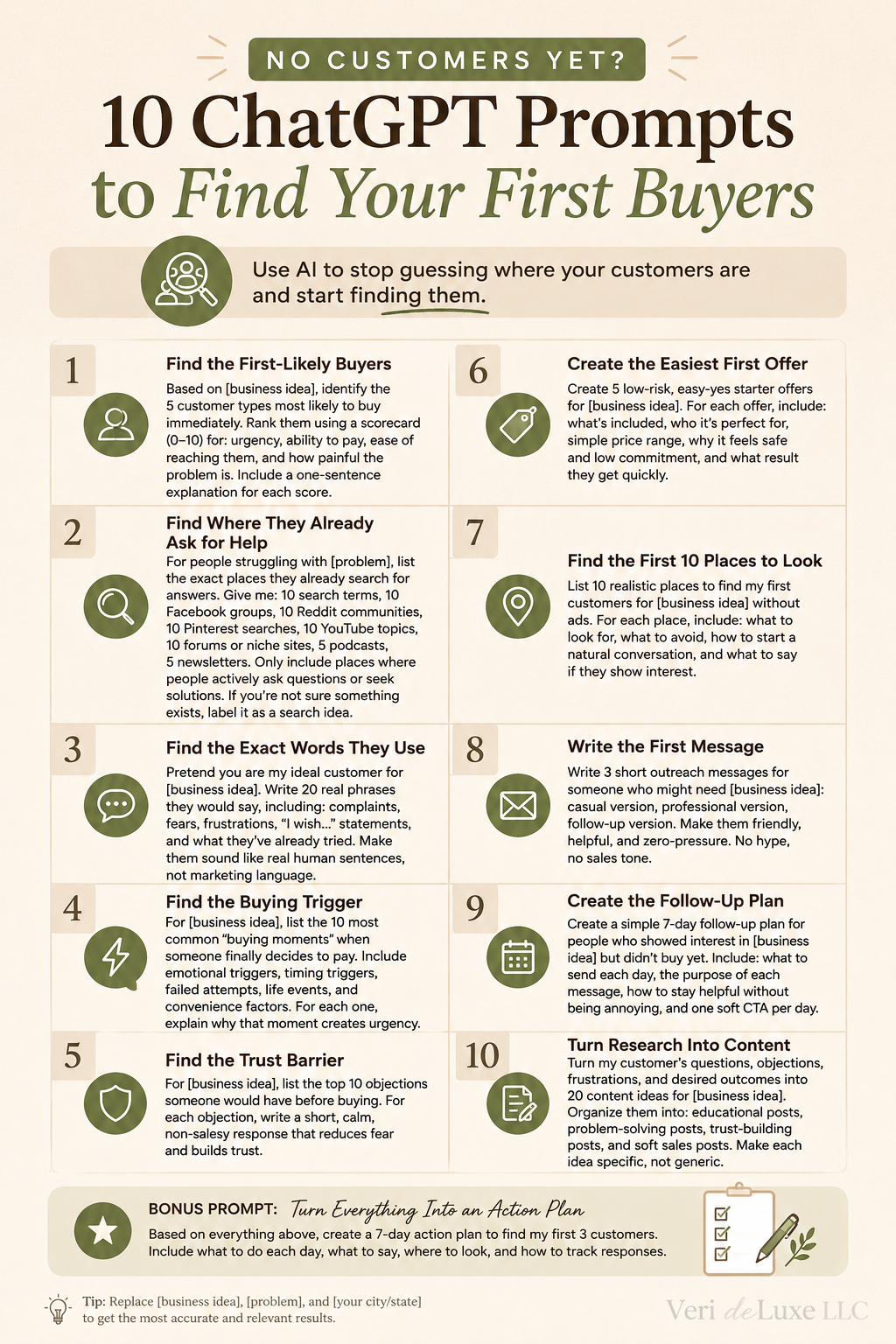
    The infographic below is a quick reference guide. Under it, you’ll find the full copy-and-paste prompts.

    No customers yet? 10 ChatGPT prompts to find your first buyers

    Quick Tip: The more information you give ChatGPT, the better the results. Include your business idea, location, budget, experience level, and ideal customer whenever possible.

    Important: If ChatGPT is not certain a group, podcast, newsletter, website, or community exists, ask it to label it as a search idea instead of presenting it as fact. That helps you use the ideas as research leads instead of assuming every result is verified.

    1. Find the First-Likely Buyers

    Instead of asking who might buy someday, focus on who would be most likely to buy first.

    Copy & Paste Prompt:

    Based on [business idea], identify the 5 customer types most likely to buy immediately. Rank them using a scorecard (0–10) for urgency, ability to pay, ease of reaching them, and how painful the problem is. Include a one-sentence explanation for each score.

    2. Find Where They Already Ask for Help

    Your customers are probably already looking for answers somewhere. This prompt helps you find places to research.

    Copy & Paste Prompt:

    For people struggling with [problem], list the exact places they already search for answers.

    Give me:

    • 10 search terms
    • 10 Facebook group ideas
    • 10 Reddit community ideas
    • 10 Pinterest searches
    • 10 YouTube topics
    • 10 forums or niche websites
    • 5 podcasts
    • 5 newsletters

    Only include places where people actively ask questions or seek solutions.

    If you are not sure a specific group, podcast, newsletter, or forum exists, label it as a search idea instead of presenting it as fact.

    3. Find the Exact Words They Use

    Most businesses sound too polished. Real customers usually describe problems in plain, frustrated, messy language.

    Copy & Paste Prompt:

    Pretend you are my ideal customer for [business idea].

    Write 20 real phrases you would say, including:

    • complaints
    • fears
    • frustrations
    • “I wish…” statements
    • what you’ve already tried

    Make them sound like real human sentences, not marketing language.

    4. Find the Buying Trigger

    People rarely buy randomly. Usually, something pushes them from “maybe later” to “I need help now.”

    Copy & Paste Prompt:

    For [business idea], list the 10 most common buying moments when someone finally decides to pay.

    Include:

    • emotional triggers
    • timing triggers
    • failed attempts
    • life events
    • convenience factors

    For each one, explain why that moment creates urgency.

    5. Find the Trust Barrier

    Before someone buys, they usually have concerns. This prompt helps you find those concerns before they quietly lose interest.

    Copy & Paste Prompt:

    For [business idea], list the top 10 objections someone would have before buying.

    For each objection, write a short, calm, non-salesy response that reduces fear and builds trust.

    6. Create the Easiest First Offer

    Sometimes your first offer should be smaller, simpler, and easier to say yes to than your main offer.

    Copy & Paste Prompt:

    Create 5 low-risk, easy-yes starter offers for [business idea].

    For each offer include:

    • what’s included
    • who it’s perfect for
    • simple price range
    • why it feels safe and low commitment
    • what result they get quickly

    7. Find the First 10 Places to Look

    Instead of posting everywhere and hoping someone notices, use ChatGPT to help you narrow down where to look first.

    Copy & Paste Prompt:

    List 10 realistic places to find my first customers for [business idea] without ads.

    For each place include:

    • what to look for
    • what to avoid
    • how to start a natural conversation
    • what to say if they show interest

    8. Write the First Message

    Many people know who to contact, but they freeze when it is time to write the message.

    Copy & Paste Prompt:

    Write 3 short outreach messages for someone who might need [business idea]:

    • casual version
    • professional version
    • follow-up version

    Make them friendly, helpful, and zero-pressure.

    No hype. No sales tone.

    9. Create the Follow-Up Plan

    Most people do not buy after the first interaction. A simple follow-up plan helps you stay helpful without being annoying.

    Copy & Paste Prompt:

    Create a simple 7-day follow-up plan for people who showed interest in [business idea] but did not buy yet.

    Include:

    • what to send each day
    • the purpose of each message
    • how to stay helpful without being annoying
    • one soft CTA per day

    10. Turn Research Into Content

    Customer research should not sit in a notebook. Turn the questions, objections, and frustrations into useful content.

    Copy & Paste Prompt:

    Turn my customer’s questions, objections, frustrations, and desired outcomes into 20 content ideas for [business idea].

    Organize them into:

    • educational posts
    • problem-solving posts
    • trust-building posts
    • soft sales posts

    Make each idea specific, not generic.

    Bonus Prompt: Turn Everything Into an Action Plan

    Once you have completed the prompts above, use this one to tie everything together.

    Copy & Paste Prompt:

    Based on everything above, create a 7-day action plan to find my first 3 customers.

    Include:

    • what to do each day
    • what to say
    • where to look
    • how to track responses

    Final Thoughts

    Many new businesses spend months building before they spend enough time finding buyers.

    Use these prompts to understand who your customers are, where they spend time, what they care about, and how to start conversations that may lead to sales.

    You do not need thousands of customers right away.

    You need your first few buyers. Start there.

  • Ask AI These 10 Questions Before You Start a Small Business

    Ask AI These 10 Questions Before You Start a Small Business

    10 ChatGPT Prompts to Use Before Starting a Small Business

    Most new business owners spend time worrying about logos, websites, business cards, social media accounts, and brand colors.

    The problem?

    None of those things tell you whether people want what you’re selling.

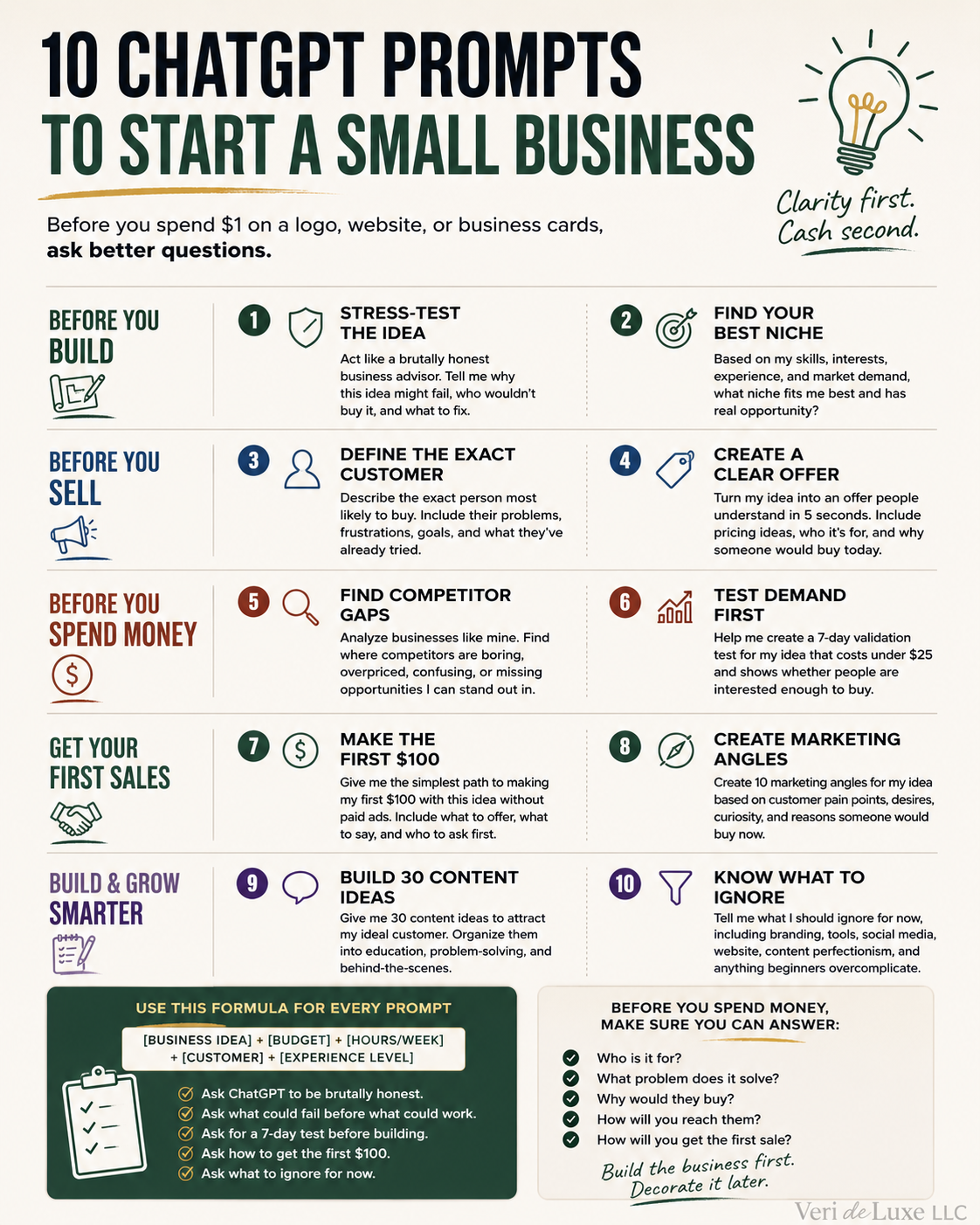
    Before you spend money, use ChatGPT to pressure-test your business idea, understand your customer, and focus on the things that matter most.

    10 ChatGPT prompts to start a small business before spending money

    Quick Tip: The more details you give ChatGPT, the better the answers. Include your business idea, budget, experience level, available time, and target customer whenever possible.

    1. Stress-Test the Idea

    Before you fall in love with an idea, let ChatGPT try to break it.

    Copy & Paste Prompt:

    Act like a brutally honest business advisor. I want to start [business idea]. Tell me why this might fail, who would not buy it, what people would complain about, and what I should fix before spending money.

    2. Find Your Best Niche

    Sometimes the best business is not your first idea.

    Copy & Paste Prompt:

    Based on my skills, interests, experience, budget, and time available, give me 10 small business niches that fit me. Rank them by startup cost, demand, competition, profit potential, and ease of getting customers.

    3. Define the Exact Customer

    A business for everyone usually sells to no one.

    Copy & Paste Prompt:

    Based on this business idea: [business idea], describe the exact person most likely to pay for it. Include their problem, frustrations, what they want instead, what they have already tried, and what would make them buy.

    4. Create a Clear Offer

    People buy solutions, not vague ideas.

    Copy & Paste Prompt:

    Turn my business idea, [business idea], into a clear offer people understand in 5 seconds. Include pricing ideas, who it is for, who it is not for, and why someone would buy today.

    5. Find Competitor Gaps

    Do not copy competitors. Find what they are missing.

    Copy & Paste Prompt:

    Analyze businesses like mine. Find where competitors are boring, overpriced, confusing, too generic, or missing opportunities. Give me practical ways to stand out.

    6. Test Demand First

    A logo is not validation. A website is not validation. Likes are not validation.

    Copy & Paste Prompt:

    Help me create a 7-day validation test for [business idea] that costs under $25 and shows whether people are interested enough to buy.

    7. Make the First $100

    Your first sale teaches you more than months of planning.

    Copy & Paste Prompt:

    Give me the simplest path to making my first $100 with [business idea] without paid ads. Include who to contact, what to offer, what to say, and what to do if no one responds.

    8. Create Marketing Angles

    Give people a reason to care.

    Copy & Paste Prompt:

    Create 10 marketing angles for [business idea] based on customer pain points, mistakes, frustrations, desired outcomes, curiosity, and reasons someone would buy now.

    9. Build 30 Content Ideas

    Never stare at a blank screen again.

    Copy & Paste Prompt:

    Create 30 content ideas for [business idea]. Organize them into education, problem-solving, behind-the-scenes, customer mistakes, product or service benefits, comparison posts, and sales posts.

    10. Know What to Ignore

    One of the hardest parts of starting a business is knowing what not to do.

    Copy & Paste Prompt:

    Tell me what I should ignore for now, including branding, tools, social media, website, paperwork, content, perfectionism, and anything beginners overcomplicate.

    Final Thoughts

    ChatGPT cannot guarantee a successful business.

    What it can do is help you ask better questions before you spend money.

    Use these prompts to challenge assumptions, identify weaknesses, understand customers, and focus on the work that matters most.

    Build the business first. Decorate it later.

  • Free Phishing Training

    Free Phishing Training

    VeriSecure Training

    Phishing Awareness Training

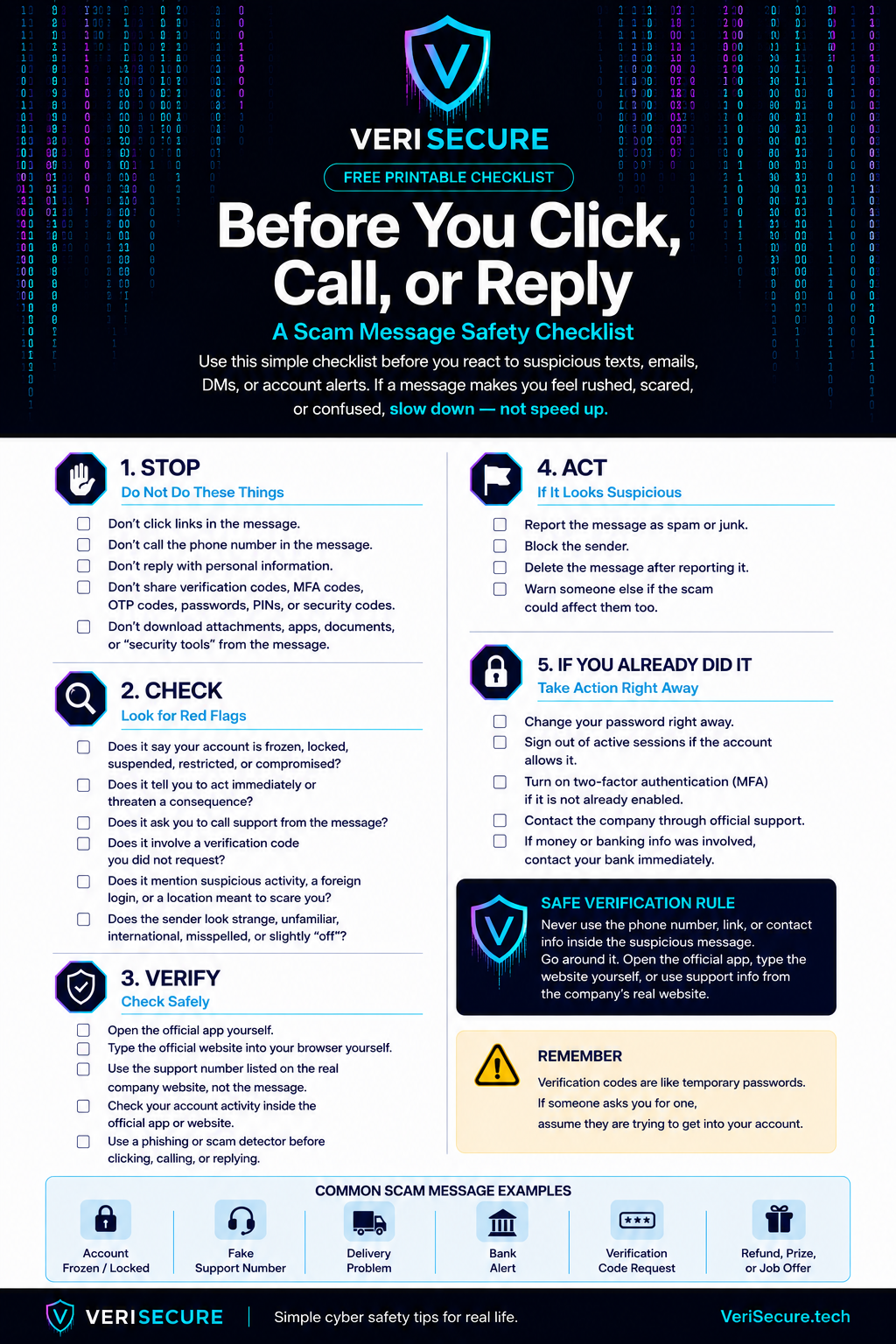
    A short, practical lesson for office employees to spot suspicious links, fake logins, urgent scams, and “please handle this right now” nonsense before it becomes everyone’s problem.

    Start Here: The Scam That Looks Normal

    You are halfway through your workday when an email pops up that looks like it came from Microsoft, your boss, HR, payroll, or a vendor.

    It says your account is locked. Or your password is expiring. Or an invoice needs immediate review. Or a document was shared with you.

    It looks boring. That is the trick.

    Phishing works because it hides inside normal work. It does not always look like a cartoon villain email from a prince with a banking problem. Sometimes it looks like Tuesday.

    The golden rule:
    Stop. Check. Report. Stop before clicking. Check the sender and link. Report anything suspicious through the official company process.

    What Is Phishing?

    Phishing is when a scammer pretends to be someone trustworthy so they can trick you into doing something risky.

    Usually, they want you to:

    • click a fake link
    • enter your password on a fake login page
    • open a malicious attachment
    • send money or gift cards
    • approve a fake request
    • share private company, customer, payroll, or personal information

    The goal is simple: make you act before you think.

    Very sophisticated. Very annoying. Very much not your fault if it looks convincing — scammers spend their whole day making this garbage look real.

    Common Warning Signs

    Most phishing messages have at least one warning sign. You do not need to be a cybersecurity expert. You just need to slow the process down long enough to notice what feels off.

    Urgent threats

    Messages like “your account will be locked,” “final warning,” or “immediate action required” are designed to make you rush.

    Suspicious links

    Hover over links on desktop, or press and hold on mobile, to preview where they really go before opening them.

    Odd sender address

    The display name may look familiar, but the real email address may be misspelled, random, or from a free email service.

    Unexpected attachments

    Fake invoices, payroll forms, shipping notices, or “updated documents” are common bait.

    Fake login pages

    A message says your Microsoft, Google, payroll, or company account needs verification. Convenient. Also suspicious.

    Gift card requests

    A “boss” asks you to buy gift cards urgently. This scam has been around forever because apparently it still works.

    Fake file shares

    Scammers copy OneDrive, SharePoint, Dropbox, Google Drive, and DocuSign-style emails to steal logins.

    Requests to bypass process

    Anything asking you to skip normal approval, payment, payroll, or security steps deserves extra attention.

    What To Do Instead

    If something feels suspicious, do not try to “investigate” by clicking around. That is how the scam gets a second chance.

    • Do not click links. Go directly to the official website or app instead.
    • Do not open unexpected attachments. Especially invoices, payroll files, ZIP files, or “secure documents.”
    • Do not reply with sensitive information. Real IT, payroll, banks, and vendors should not need your password by email. Ever.
    • Do not forward suspicious emails to coworkers. Use the official reporting method so IT can inspect it safely.
    • Verify through a known channel. Use a known phone number, company chat, ticketing system, or official website — not the contact info inside the suspicious email.
    • Report it. Send suspicious messages to your IT/security team using the approved method.
    Report suspicious emails here: [Insert IT Helpdesk Email / Phishing Report Button / Ticket Link Here]

    Tip: Replace the placeholder above with your company’s real reporting email, security mailbox, helpdesk link, or “Report Phishing” button instructions.

    Reporting Is Not Getting in Trouble

    This part matters.

    If you clicked something suspicious, report it quickly. Do not sit there silently hoping the email fairy reverses time.

    Security teams would rather hear about a possible mistake early than discover it later after accounts, files, or customer data are involved.

    Reporting a suspicious email is not tattling on yourself. It is how IT protects everyone else before the same scam spreads.

    If You Already Clicked Something Suspicious

    Do not panic, but do not ignore it either. Fast reporting helps stop small problems before they become company-wide headaches.

    • If you clicked a link: close the page and report it.
    • If you entered your password: change it immediately from a trusted device and notify IT.
    • If you opened an attachment: stop using the device and contact IT.
    • If you approved an MFA prompt you did not request: report it immediately.
    • If you shared payment, payroll, customer, or personal information: report it right away so the company can respond quickly.
    Do not delete the email unless IT tells you to. The security team may need the message headers, links, attachment details, or timing to investigate.

    Quick Phishing Safety Checklist

    • Stop before clicking anything unexpected.
    • Check the real sender address, not just the display name.
    • Preview links before opening them.
    • Be suspicious of urgency, threats, and “do this now” language.
    • Do not open unexpected attachments.
    • Verify payment, payroll, password, and login requests through a known channel.
    • Do not forward suspicious emails to coworkers.
    • Report suspicious messages using the official process.
    • If you clicked or entered information, report it quickly.

    Phishing Awareness Quiz

    Check what you remember. No pressure. This is training, not a courtroom drama.

    The Takeaway

    Phishing works because people are busy, distracted, and trying to get through the day. Scammers know that. They count on it.

    You do not have to be paranoid. You just need a pause button.

    Stop before clicking. Check the sender and link. Report anything suspicious. One slow click can save a very long cleanup.

  • Claude.AI Review: A Flawed Token System That Wastes Your Time

    Claude.AI Review: A Flawed Token System That Wastes Your Time

    A Flawed Token System That Wastes Your Time: My Claude.AI Experience

    Claude may be powerful, but my experience with its usage limits turned a simple website task into a stop-start mess.

    VeriSecure Tool Review

    I recently tried Claude for a few backend tasks related to my website and business.

    Nothing dramatic. I was not asking it to rebuild the internet, write a classified government system, or perform some AI miracle while violins played in the background.

    I needed help reorganizing website categories and cleaning up some structure.

    Basic website housekeeping.

    Since Claude offers a free tier, I wanted to test it before deciding whether it was worth adding to my regular workflow.

    That test did not go well.

    The Short Version

    Claude started the task, hit a usage limit before finishing, pushed me toward upgrading, then failed to resume the work cleanly after the reset.

    The problem was not simply that a free plan had limits.

    Free plans have limits. Fine. That is expected.

    The problem was that Claude accepted the work, let the task run into a wall, and then gave me no reliable way to continue where it left off.

    That is not just inconvenient.

    That breaks the workflow.

    The Task Was Small. The Usage Limit Was Not.

    For context, my website is small. The task was not especially AI-intensive.

    I asked Claude to help reorganize website categories and structure information in a more useful way.

    That is exactly the kind of thing AI tools advertise themselves as being useful for: organizing, cleaning up, planning, and saving time.

    Claude started the work and made some progress.

    Then it stopped because I hit the free usage limit.

    Again, the issue is not that the free tier had a limit. The issue is that Claude did not warn me upfront that the task might exceed the available usage window.

    It accepted the task, got partway through, and left the work unfinished.

    Then the interface pushed me toward upgrading.

    And that is where the whole thing started feeling less like a productivity tool and more like a vending machine that eats your dollar, blinks politely, and suggests buying the bigger plan.

    Small Educational Note: Tokens Are Not How Normal People Think

    AI companies often measure usage with tokens, messages, context windows, model limits, and reset periods.

    That may make sense internally.

    But normal users do not think, “How many tokens will this category cleanup cost?”

    They think:

    • Can this finish my task?
    • Can it continue later?
    • Will I lose my work?
    • Will I need to explain everything again?
    • If I pay, what does that actually get me?

    That gap is the problem.

    If the product speaks in usage multipliers but the user works in real tasks, someone is going to end up frustrated. Spoiler: it is not the billing page.

    The Upgrade Messaging Was Not Clear Enough

    After Claude hit the usage limit, I looked at the paid options.

    The usage language sounded impressive, but not practical enough for what I needed to know.

    Anthropic’s help documentation describes paid plans in terms of usage capacity, including Pro, Max 5x, and Max 20x. Max 5x is listed as 5x Pro capacity per session, and Max 20x is listed as 20x Pro capacity per session.

    That sounds helpful on paper.

    But as a user, I was not trying to buy “capacity per session.”

    I was trying to figure out whether Claude could finish the work it had already started.

    That is a very different question.

    What I needed to know was:

    • Will this plan finish a website organization task?
    • How much does a long conversation reduce usable capacity?
    • Does task complexity affect the limit?
    • Does the model choice change how fast usage gets consumed?
    • Will recovery attempts count against me if Claude fails mid-task?
    • Will I be able to continue the same work after a reset?

    Those are the questions that matter when you are using AI for real work.

    A multiplier like “5x” or “20x” sounds big, but it does not tell a regular user what they can actually complete.

    People do not buy AI because they want a bigger invisible meter.

    They buy it because they want work finished.

    Five Hours Later, I Still Could Not Resume the Work

    After hitting the usage limit, I waited for the reset period and returned to the same chat.

    I asked Claude to continue where it left off.

    It responded like it could keep going.

    Then it failed.

    When I clicked to try again, I was told the chat was full and that I needed to start a new conversation.

    So the process went like this:

    • Claude accepted the task.
    • Claude started the work.
    • Claude hit a usage limit before finishing.
    • The interface pushed an upgrade.
    • I waited for usage to reset.
    • I returned to continue the same task.
    • Claude could not finish the response.
    • The chat was suddenly too full to continue.
    • I had to start a new conversation.
    • The new chat did not have the full context of the previous work.

    That is not a smooth workflow.

    That is a dead end with extra steps.

    And once that happens, the user is no longer doing the original task. The user is now managing the AI tool’s limitations.

    That is backwards.

    The Most Annoying Part: Recovery Burned Usage Too

    Before trying to resume, the interface made it look like I still had usable capacity.

    But I spent that remaining capacity trying to get Claude to continue a task it had already abandoned.

    That is not productive usage.

    That is recovery usage.

    There is a difference.

    If an AI tool stops mid-task because of its own usage limits, the user should not have to burn more limited usage explaining the same context again, asking it to resume, or rebuilding the conversation from scratch.

    That is like hiring someone to organize your office, having them leave halfway through, and then being charged extra because you had to remind them where the office was.

    No thanks.

    The Real Problem Is Task Continuity

    I understand that AI tools have limits.

    Longer chats use more context. Larger files use more capacity. More complex tasks can burn through available usage faster. Different models and features can affect limits too.

    That part makes sense.

    The problem is that Claude accepted work it could not finish and then gave me no clean way to continue that work after the reset.

    A better system would ask the right questions before the user hits the wall:

    • Is this task likely to exceed the current usage window?
    • Is the chat getting too long to continue safely?
    • Should the user split the project into smaller parts?
    • Should Claude create a summary before the session ends?
    • Should Claude provide a handoff note for the next chat?
    • Will the user be able to resume after the reset?

    Those are not luxury features.

    Those are basic workflow protections.

    If a tool is going to stop users mid-task, it needs a better way to preserve the work.

    What Support Clarified

    When I contacted support, the explanation confirmed the parts that matter most from a user perspective.

    Usage can depend on things like message length, files, conversation length, model choice, and features used. Claude’s own help documentation also explains that usage limits reset on a session basis and that limits can vary depending on how you use the tool.

    That explains why the experience happened.

    It does not make it less frustrating.

    Because from the user side, the experience was simple:

    • Claude started the job.
    • Claude stopped mid-task.
    • Claude told me to wait.
    • Claude failed to resume properly.
    • Claude forced me to rebuild the context.

    That is the problem.

    If a product is being sold as a serious work assistant, the system needs to protect the work better than this.

    The Problem with Token-Based AI for Real Work

    Token-based systems can become very user-unfriendly when users cannot see the real cost of a task before starting.

    Most people are not trying to calculate message length, context windows, model behavior, and reset timing.

    They are trying to get something done.

    A good AI workflow should help users understand:

    • whether a task is too large for the current session
    • whether they should split the task into smaller parts
    • whether the chat is getting too full
    • whether continuing later will work
    • whether recovery attempts will burn more usage
    • what a paid plan realistically changes

    Without that, users are left guessing.

    And guessing is not a workflow.

    It is a tech company making the user do the planning the product should have handled.

    What Claude Needs to Improve

    Claude may be a strong AI model. That is not really the issue.

    The issue is reliability.

    If Anthropic wants people using Claude for real business workflows, the platform needs stronger safeguards around limits, interruptions, and recovery.

    1. Better Task Continuity

    If a task stops because of usage limits, users should be able to resume from the same point after the reset.

    Not “start a new chat and explain everything again.”

    A serious work tool needs a serious handoff system.

    2. Clearer Usage Transparency

    Usage multipliers sound impressive, but users need practical expectations.

    Tell people what affects usage, what drains it faster, and what kinds of tasks are likely to hit limits.

    People should not need a decoder ring to understand whether a paid plan can finish their work.

    3. Pre-Task Warnings

    Before Claude accepts a larger task, it should warn the user if the job may exceed the current session.

    Something simple would help:

    “This task may be too large to complete in one session. Do you want me to break it into smaller steps?”

    That would prevent a lot of frustration.

    It would also make Claude feel more like a work assistant and less like a machine that waits until you are invested before announcing the meter ran out.

    4. Better Error Handling

    If Claude fails while trying to resume an interrupted task, that recovery attempt should not punish the user.

    The system should not burn limited usage while the user is trying to recover from a failure the platform created.

    Recovery should be treated differently from normal usage.

    Because when the user is spending their allowance just trying to get back to where they already were, the product has stopped helping.

    Quick Takeaways

    • Claude may be useful for short tasks, writing, planning, and research.
    • My issue was not that limits exist. It was how the platform handled an interrupted task.
    • Usage claims like 5x or 20x need clearer real-world explanations.
    • AI tools should warn users before starting tasks that may exceed the session.
    • Interrupted work should be easier to resume.
    • Recovery attempts should not waste more limited usage.
    • If you need long, continuous business workflows, be careful before paying.

    The Takeaway

    Claude has potential.

    The model can produce strong responses. I can see why people like it for writing, planning, research, coding, and brainstorming.

    But based on my experience, the usage system is not transparent enough for the kind of practical workflow I needed.

    The biggest issue is not simply that limits exist.

    The issue is that Claude can let you start a task, stop before the work is finished, fail to resume cleanly, and make you spend more usage trying to recover.

    That is not efficient.

    That is not user-friendly.

    If you only use Claude for quick questions or short writing help, you may be fine.

    But if you want it for real business workflows, website organization, long chats, or anything that requires continuity, be careful before paying.

    A tool that starts the job but cannot reliably help you finish it is not saving time. It is just creating a more expensive version of “try again later.”

  • The Reality of AI: 50 Jobs That Are Harder to Replace

    The Reality of AI: 50 Jobs That Are Harder to Replace

    Top 50 Jobs Hardest for AI to Replace

    Ranked from most exposed to most resistant — because no job is AI-proof, but some are much harder to fully automate.

    VeriSecure Tech Reality Check

    Imagine two workers sitting in the same office.

    One spends most of the day drafting emails, summarizing reports, building slide decks, and moving information from one system to another because apparently software still has not figured out how to talk to itself like an adult.

    The other is crawling through a mechanical room trying to diagnose why an HVAC system is making a noise that sounds like a washing machine full of gravel.

    AI can change both jobs.

    But it is much more likely to replace pieces of the first one before it replaces the second one.

    That is the point of this list.

    Artificial intelligence is moving fast. It is already reshaping office work, customer support, design, marketing, coding, research, admin work, and even parts of management.

    But not every job faces the same level of risk.

    Some careers are harder to fully replace because they depend on physical presence, human judgment, trust, emotional intelligence, hands-on skill, safety accountability, and the ability to deal with real-world mess. And real-world mess is where software often starts looking for a manager.

    First: No Job Is Completely AI-Proof

    Let’s get this out of the way before someone in the comments starts warming up their keyboard.

    A job being “harder for AI to replace” does not mean it will stay exactly the same.

    AI may still change the tools, workflow, hiring patterns, training path, customer expectations, and daily responsibilities of every job on this list.

    This ranking is about resistance to full replacement, not immunity from change.

    Translation: AI may become part of the job. That does not mean AI can do the whole job alone without a human somewhere responsible for the outcome.

    How This Ranking Works

    This ranking is based on how much each job depends on:

    • physical presence
    • hands-on repair, installation, inspection, or care
    • unpredictable real-world environments
    • emotional intelligence and trust
    • legal, medical, financial, or safety accountability
    • licensing or specialized training
    • leadership, negotiation, and human relationships
    • critical infrastructure demand
    • human judgment when something goes wrong

    The more a job lives only inside a screen, the easier it is for AI to disrupt.

    The more a job requires physical skill, human trust, messy judgment, safety responsibility, or fixing things in the real world, the harder it is to fully replace.

    Changed Is Not the Same as Replaced

    This is where people get tripped up.

    A job can be heavily changed by AI without being fully replaced by AI.

    A teacher may use AI to help draft lesson plans, but still needs to manage a classroom full of actual humans with actual emotions and occasionally the impulse control of caffeinated raccoons.

    A designer may use AI for concepts, but still needs taste, client judgment, brand understanding, and the ability to explain why “make it pop” is not a complete creative brief.

    A mechanic may use diagnostic software, but still needs to physically inspect, troubleshoot, repair, and make judgment calls when the machine does not behave like the manual promised.

    That difference matters.

    AI will change many jobs. This list is about which jobs are hardest to fully remove from human hands.

    The 50 Jobs Hardest for AI to Replace

    Ranked from most exposed to most resistant.

    Tier 1: Creative, Strategy, and People-Heavy Office Roles

    These jobs are already being changed by AI. Some tasks are easy to automate or speed up, especially drafting, summarizing, planning, research, and first-pass content.

    But the human value is still there when the job requires taste, relationships, judgment, trust, strategy, leadership, or knowing when the AI output is polished nonsense wearing a blazer.

    1. Graphic Designer — AI can generate layouts and concepts, but strong design still needs taste, brand judgment, and human direction.
    2. Content Creator — AI can draft content, but personality, audience trust, lived experience, and community connection are harder to fake.
    3. Marketing Strategist — AI can help with ideas and data, but strategy still depends on audience understanding and business judgment.
    4. Public Relations Specialist — AI can draft statements, but reputation management, crisis judgment, and relationships still need humans.
    5. Business Consultant — AI can analyze and summarize, but clients pay for judgment, context, and someone willing to own recommendations.
    6. Project Manager — AI can schedule and track tasks, but humans still handle competing priorities, personalities, and chaos dressed as “stakeholder feedback.”
    7. Human Resources Manager — AI can screen and automate paperwork, but sensitive employee issues still require judgment, fairness, and trust.
    8. Financial Advisor — AI can crunch numbers, but people still need trust, accountability, and guidance during high-stress money decisions.
    9. Sales Executive — AI can assist with leads and scripts, but high-value sales still depend on trust, timing, negotiation, and reading people.
    10. Lawyer, Complex Cases — AI can research and draft, but complex legal strategy, courtroom judgment, ethics, and accountability still require humans.
    11. Executive Leader / CEO — AI can support decisions, but leadership, accountability, vision, crisis management, and human trust still matter. Annoying, but true.
    12. Teacher — AI can support lesson planning and tutoring, but classroom management, motivation, safety, and emotional judgment are not simple automation tasks.
    13. College Professor — AI can assist with research and grading support, but mentorship, expertise, academic judgment, and live teaching still matter.
    14. Social Worker — AI can help with documentation, but human trust, crisis response, and emotional complexity keep this role deeply human.
    15. Mental Health Counselor — AI tools may support access and journaling, but high-stakes care, trust, ethics, and human presence are much harder to replace.

    Small Educational Note: Why Some White-Collar Jobs Still Made the List

    Some office jobs are very exposed to AI, but not all of them are equally replaceable.

    The safest white-collar workers will not be the ones doing repeatable tasks all day. They will be the ones making decisions, managing risk, building trust, leading people, handling sensitive situations, and checking AI output before it causes a very expensive “oops.”

    AI can make a first draft. It cannot be the person everyone trusts when things go sideways.

    Tier 2: Healthcare, Emergency Response, and Human Care

    These jobs are harder to replace because they require physical presence, trust, real-time judgment, emotional intelligence, licensing, and responsibility for human safety.

    AI may help with documentation, imaging, triage, scheduling, and decision support. But when someone is in pain, scared, injured, confused, or in danger, “the chatbot will see you now” is not exactly comforting.

    1. Registered Nurse — AI can assist with records and monitoring, but hands-on care and patient judgment stay human-heavy.
    2. Nurse Practitioner — clinical judgment, patient interaction, diagnosis support, and care planning make full replacement difficult.
    3. Primary Care Physician — AI can assist with information, but patient trust, diagnosis, accountability, and treatment decisions still need humans.
    4. Surgeon — robotics may assist, but surgical judgment, precision, accountability, and emergency decision-making are not easily automated away.
    5. Physical Therapist — recovery requires physical assessment, motivation, adjustment, and hands-on care.
    6. Occupational Therapist — helping people adapt to real-life limitations requires human creativity, patience, and physical evaluation.
    7. Respiratory Therapist — breathing support, emergency care, and patient monitoring require real-time clinical judgment.
    8. Medical Imaging / Radiology Technologist — AI may read images, but humans still position patients, operate equipment, ensure safety, and handle real-world complications.
    9. Dental Hygienist — AI is not cleaning your teeth, managing patient comfort, or spotting chairside issues without human hands involved.
    10. Veterinarian — medical judgment plus unpredictable animals makes this far harder to automate than a spreadsheet.
    11. Childcare Provider — safety, emotional care, supervision, and human trust make this role deeply human.
    12. Mental Health Crisis Worker — high-stakes empathy, risk judgment, and trust are hard to outsource to software.
    13. Paramedic — emergency medical care happens fast, physically, and in messy environments AI cannot control.
    14. Firefighter — unpredictable danger, physical skill, teamwork, and rescue judgment keep this highly resistant.
    15. Search and Rescue Specialist — terrain, weather, human distress, and urgent decision-making make full automation extremely difficult.

    Tier 3: Trades, Repair, Infrastructure, and Real-World Problem Solving

    This is where AI hits a wall.

    Not because these jobs will avoid technology. They will not.

    But these roles involve physical systems, unpredictable environments, safety risks, specialized tools, and problems that do not happen neatly inside a browser tab.

    AI can suggest what might be wrong. A human still has to climb, inspect, repair, install, test, weld, wire, troubleshoot, and avoid turning a small problem into a news story.

    1. Professional Cleaner / Organizer — physical work, trust inside homes, judgment, and real-world mess make this harder to fully automate than people think.
    2. Diesel Mechanic — heavy equipment, diagnostics, physical repair, and field conditions keep humans central.
    3. Heavy Equipment Mechanic — large machines break in inconvenient ways, because machines apparently have a flair for drama.
    4. Aircraft Mechanic — safety regulations, inspection, precision, and accountability make full replacement highly unlikely.
    5. Machinist — AI can support programming, but material knowledge, precision, setup, and troubleshooting matter.
    6. CNC Programmer — AI can assist with code, but manufacturing judgment, tolerances, materials, and shop-floor reality still require expertise.
    7. Welder — physical skill, inspection, materials, safety, and changing job sites make full automation hard outside controlled environments.
    8. Electrician — every building has its own wiring story, and half of them read like a crime scene.
    9. Plumber — water, pressure, old pipes, crawl spaces, and emergency repairs are not easily automated.
    10. HVAC Technician — diagnostics, installation, repair, and real-world troubleshooting keep this role highly resistant.
    11. Elevator Repair Technician — safety, mechanical systems, electrical systems, and code compliance make this a strong AI-resistant job.
    12. Industrial Pipefitter — physical installation, industrial safety, and specialized systems require hands-on expertise.
    13. Construction Manager — AI can schedule and estimate, but job sites require coordination, safety judgment, vendor wrangling, and human problem-solving.
    14. Water / Wastewater Treatment Operator — public health, equipment, regulations, inspections, and emergency response keep humans in the loop.
    15. Power Plant Operator — critical infrastructure requires monitoring, judgment, safety procedures, and accountability.

    Tier 4: Energy, Data Centers, Cybersecurity, and AI’s Own Supply Chain

    The more AI expands, the more it depends on electricity, cooling, data centers, networks, chips, cybersecurity, compliance, and infrastructure.

    That is the funny part nobody puts in the glossy AI demo.

    AI may live in “the cloud,” but the cloud is not magic. It is buildings, servers, cables, power, cooling, technicians, engineers, and people getting called when something breaks at the worst possible time.

    1. Solar Energy Technician — renewable energy growth and physical installation work make this more resistant than many screen-based jobs.
    2. Wind Turbine Technician — turbines need inspection, climbing, repair, maintenance, safety judgment, and humans who are apparently comfortable being very high in the air.
    3. Substation Technician — electrical infrastructure needs hands-on maintenance, testing, safety procedures, and field expertise.
    4. Electrical Lineman — grid repair, dangerous conditions, storms, heights, and emergency response make this extremely hard to automate fully.
    5. Utility Grid Operator — AI can help monitor, but humans still manage critical decisions, reliability, emergencies, and safety.
    6. Semiconductor Manufacturing Specialist — AI depends on chips, and chip production depends on specialized human expertise, precision, and facilities.
    7. Robotics Maintenance Technician — more robots means more people needed to repair the robots when the robots have a moment.
    8. Data Center Technician — AI systems need servers, cooling, power, hardware swaps, cabling, monitoring, and real people on-site.
    9. Cybersecurity and Incident Response Specialist — AI can help detect threats, but humans still investigate, contain, prioritize, and make judgment calls during attacks.
    10. AI Governance and Compliance Specialist — as AI spreads, companies need humans to manage risk, policy, audits, privacy, safety, and accountability.
    11. Industrial Automation Engineer — companies using automation need people who can design, maintain, troubleshoot, and improve those systems.
    12. Nuclear Energy Technician — high-risk energy systems require strict safety procedures, technical expertise, and human accountability.
    13. Environmental Engineer — infrastructure, regulation, public safety, environmental systems, and field judgment make this hard to fully replace.
    14. Electrical Grid and Infrastructure Engineer — AI depends on reliable power, and reliable power depends on people who understand the grid in the real world.
    15. Critical Infrastructure Systems Engineer — the more automated the world gets, the more valuable people become who can keep the underlying systems stable, secure, and running.

    What This List Does Not Mean

    This list does not mean these jobs will be easy.

    It does not mean they will automatically pay well in every location.

    It does not mean AI will not affect them.

    And it definitely does not mean everyone should quit their job tomorrow and become an elevator technician by Friday. Please do not make major life decisions from one article and a panic spiral.

    It means these careers have traits that make full AI replacement harder:

    • real-world physical work
    • high-stakes responsibility
    • trust and emotional judgment
    • safety and licensing requirements
    • complex hands-on problem solving
    • critical infrastructure demand
    • human accountability when things go wrong

    How to Make Yourself Harder to Replace

    The safest workers will not be the ones who avoid AI.

    They will be the ones who use AI for the repeatable parts while getting better at the parts AI struggles to copy.

    Focus on skills like:

    • judgment: knowing what matters and what does not
    • trust: being the person people rely on when stakes are high
    • communication: explaining complicated things clearly
    • physical execution: doing real-world work software cannot perform alone
    • leadership: coordinating people, priorities, and decisions
    • accountability: owning the outcome, not just producing the task
    • AI fluency: knowing how to use AI tools without blindly trusting them

    The goal is not to become “anti-AI.” That is not a career plan. That is a bumper sticker.

    The goal is to become the person who can use the tools, check the tools, fix the mess, and make the final call.

    Quick Takeaways

    • No job is completely AI-proof.
    • Jobs inside a screen are generally easier to disrupt than jobs in the physical world.
    • AI can change a job without fully replacing it.
    • Human trust, judgment, accountability, and physical skill still matter.
    • Healthcare, trades, infrastructure, energy, cybersecurity, and AI governance have strong resistance factors.
    • The safest workers will learn to use AI while becoming stronger at the human parts AI cannot easily copy.

    The Takeaway

    The future is not as simple as “AI replaces everyone” or “AI creates better jobs for everyone.” Both takes are too neat, and real life loves ruining neat little theories.

    AI will replace some tasks. It will change many jobs. It may create new roles. It will also make some career paths harder, especially where entry-level work can be automated or compressed.

    The jobs hardest for AI to replace are the ones rooted in the real world: people, trust, safety, repairs, care, infrastructure, leadership, and accountability.

    Do not build your career around being cheaper than AI. Build it around being harder to replace: use the tools, strengthen your judgment, learn the physical or human parts of the work, and become the person trusted when the software is not enough.

  • AI Isn’t Coming for Jobs Someday — It Already Started

    AI Isn’t Coming for Jobs Someday — It Already Started

    AI Is Coming for White-Collar Jobs. Pretending Otherwise Won’t Save Us.

    The risk is not just robots replacing factory work. It is AI quietly shrinking the career ladder before most people notice.

    VeriSecure Tech Reality Check

    Imagine you are a new college graduate.

    You did the thing everyone told you to do. You got the degree. You built the resume. You applied to the “entry-level” job that somehow wants three years of experience, a software certification, a unicorn, and emotional availability.

    Then you find out the company is not hiring junior people anymore.

    Not because the work disappeared.

    Because AI is doing enough of it that the company decided one senior employee plus a few tools is cheaper than training beginners.

    That is the part people need to understand.

    AI does not have to replace every worker overnight to cause real damage. It can quietly reduce hiring, shrink teams, erase entry-level roles, and make fewer humans responsible for more output.

    And that is already a very different job market from the one people were promised.

    The Short Version

    AI is not just coming for repetitive factory work.

    It is already moving into:

    • writing
    • coding
    • research
    • customer support
    • design
    • data analysis
    • translation
    • marketing
    • recruiting
    • administrative work
    • entry-level professional tasks
    • parts of management and coordination

    That does not mean every job vanishes tomorrow.

    It means the shape of work is changing fast, and a lot of companies are going to use the word “efficiency” when they really mean “fewer people doing more work.” Corporate language: still undefeated at making bad news sound like a quarterly slide deck.

    Unemployment May Not Show Up All at Once

    One of the biggest mistakes people make is assuming AI job loss will look dramatic and obvious.

    It may not.

    It may look like this instead:

    • fewer entry-level openings
    • hiring freezes
    • contract work drying up
    • junior roles quietly disappearing
    • teams shrinking by attrition
    • one person being expected to supervise AI output that used to require three people
    • companies claiming they are “not replacing anyone” while they simply stop hiring replacements

    That is the sneaky version. The unemployment rate may not scream at first. The career ladder may just start losing rungs.

    That matters because most people do not begin as senior strategists, executives, or experts. They start by doing lower-level work, learning from it, and moving up.

    If AI absorbs the beginner work, where exactly are beginners supposed to begin?

    Important: This Is Not Just Fear-Mongering

    AI job risk is being discussed by major companies, researchers, economists, and executives.

    Anthropic CEO Dario Amodei warned that AI could eliminate a large share of entry-level white-collar jobs and push unemployment much higher within the next several years. Goldman Sachs Research has estimated that around 300 million jobs globally are exposed to automation by AI, while also noting that AI may create new jobs and boost productivity.

    So no, this is not “robots are coming, hide in the basement” nonsense.

    It is a real labor market shift, and the people most at risk are often the same people who have the least power to push back: beginners, contractors, support staff, junior workers, and anyone whose work can be turned into repeatable digital tasks.

    Sources worth reading: Axios on Dario Amodei’s AI jobs warning, Goldman Sachs Research on AI and the labor market, and World Economic Forum Future of Jobs Report 2025.

    The Difference This Time

    People like to say, “Technology has always replaced jobs, and new jobs always show up.”

    That is partly true.

    But past machines usually needed humans nearby.

    • A forklift still needed a driver.
    • A cash register still needed a cashier.
    • A spreadsheet still needed an analyst.
    • A phone system still needed customer support staff.

    AI changes the math because it can do pieces of thinking work, communication work, planning work, and creative work at scale.

    It does not need to be perfect to replace people.

    It only needs to be cheaper, faster, and good enough for the company to decide the tradeoff is worth it.

    That is not comforting, but it is important.

    A company may accept slightly worse writing, slightly clunkier support, or slightly less polished design if the labor cost drops dramatically. Quality matters until finance gets invited to the meeting.

    White-Collar Workers Were Supposed to Be Safe

    For years, people were told that education would protect them from automation.

    Learn to code. Get a degree. Move into knowledge work. Stay away from repetitive labor.

    Then AI showed up and aimed directly at knowledge work.

    Jobs and tasks under pressure include:

    • graphic design
    • writing and editing
    • junior software development
    • data analysis
    • customer support
    • translation
    • paralegal research
    • administrative support
    • marketing content
    • recruiting and resume screening
    • tutoring
    • accounting support
    • entry-level cybersecurity analysis

    That does not mean every person in those fields is doomed. It means the easy-to-repeat parts of those jobs are getting squeezed first.

    And if your job is mostly repeatable digital tasks, you need to pay attention.

    Entry-Level Jobs May Be Hit First

    This may be the most dangerous part.

    AI is often very good at the work beginners used to do while learning:

    • drafting first versions
    • summarizing research
    • answering basic support tickets
    • writing simple code
    • sorting information
    • creating reports
    • scheduling
    • reviewing documents
    • building first-pass designs

    That beginner work was never glamorous. It was not supposed to be. It was the training ground.

    If companies automate the training ground, they may save money today and create a talent shortage tomorrow.

    Because senior workers do not spawn from the floor like printer paper after a jam. Someone has to train them.

    The Other Argument: AI Could Create Jobs Too

    To be fair, not everyone sees AI as a mass unemployment machine.

    Some researchers and business leaders argue that AI will create new jobs, boost productivity, and move humans from doing repetitive work to directing, checking, and improving AI systems.

    That may happen in some areas.

    New roles may grow around AI operations, data centers, model testing, security, compliance, AI training, workflow design, and human-AI coordination.

    But here is the problem: new jobs do not always show up in the same city, at the same pay, with the same requirements, or fast enough for the people being displaced.

    “The economy will adjust eventually” sounds great in a research report. It is less comforting when rent is due on the first and your old entry-level job has been renamed “AI-assisted workflow coordinator” with five years of experience required.

    A more balanced view is this: AI may create jobs, but it can still hurt a lot of workers during the transition.

    Why It May Be Hard to Stop

    People often say, “Governments will regulate it.”

    Maybe. Eventually. After hearings, committees, lobbying, delays, rewrites, lawsuits, and enough paperwork to make a forest file a complaint.

    But companies are not waiting.

    When a tool promises lower costs, faster output, fewer employees, and bigger margins, businesses move.

    Countries move too. If one country slows down AI while another pushes ahead, the second gains economic, military, and strategic advantages.

    That creates pressure everywhere:

    • companies feel pressure to automate before competitors do
    • workers feel pressure to use AI before their jobs change without them
    • schools feel pressure to teach tools that are changing every few months
    • governments feel pressure to regulate without falling behind

    That is not a calm transition. That is everyone sprinting while pretending the hallway is not on fire.

    What Still Gives Humans an Edge

    This is not the part where we pretend “just be creative” solves everything. That advice is usually delivered by people who have not looked at a rent payment lately.

    But there are areas where humans still matter deeply.

    The safer ground may be work that requires:

    • high-stakes empathy
    • trust-based relationships
    • leadership and judgment
    • accountability when things go wrong
    • complex physical work in unpredictable environments
    • specialized trades
    • negotiation
    • crisis handling
    • strategy
    • human taste and final decision-making

    AI can draft a script for a difficult conversation.

    It cannot sit with a grieving family, fix wiring in a strange old house, calm an angry client, lead a team through a crisis, or take responsibility when a plan fails.

    That does not make those jobs untouchable. It makes them harder to flatten into a cheap automated workflow.

    Small Educational Note: Exposure Does Not Always Mean Replacement

    When reports say a job is “exposed” to AI, that does not always mean the entire job disappears.

    It often means parts of the job can be automated or sped up.

    That difference matters.

    For example, AI might help a paralegal summarize documents, but a lawyer still has to make legal judgments. AI might draft code, but an engineer still has to understand the system, test it, secure it, and own the outcome.

    The risk is not always “your whole job disappears.” Sometimes the risk is “your team needs fewer people because AI handles the first 40% of the work.”

    That is why this discussion is messy. And yes, messy is annoying. Welcome to technology, where every answer comes with an asterisk and three vendors trying to sell you a dashboard.

    The Psychological Impact Matters Too

    Work is not just a paycheck.

    For many people, work provides:

    • identity
    • structure
    • purpose
    • social connection
    • confidence
    • a sense of usefulness

    If millions of people start feeling economically unnecessary, that becomes more than a labor issue.

    It becomes a social issue.

    People were told for decades: learn skills, get credentials, work hard, and you will be valuable.

    AI is starting to challenge that promise.

    That does not mean the promise is dead. But it does mean people need a better plan than “hope my job is too complicated for software.” Hope is not a workforce strategy. It is a group project where nobody did the reading.

    What Workers Can Do Now

    The answer is not to pretend AI is going away.

    It is not.

    The better move is to become harder to replace.

    Start here:

    • Learn how AI tools are being used in your field. Do not wait until your boss understands the tool better than you do. That is a bad day.
    • Move from task-doer to reviewer and decision-maker. The person who can judge quality is harder to replace than the person who only produces the first draft.
    • Build skills AI struggles with. Judgment, empathy, leadership, trust, negotiation, accountability, and real-world problem-solving still matter.
    • Track your results. Be able to prove what you improved, saved, fixed, built, protected, or led.
    • Get comfortable with AI oversight. Learn how to prompt, check, correct, verify, and safely use AI output.
    • Do not chase every shiny tool. Learn the workflows behind the tools. The tool names will change. The thinking skills last longer.
    • Look for roles where humans are accountable for the outcome. If the work requires trust, safety, judgment, physical skill, leadership, or legal/ethical responsibility, it may have more staying power.

    This is not about becoming a robot whisperer. It is about staying useful in a workplace where software is eating the easy tasks first.

    Quick Reality Checklist

    • AI does not need to replace every job to weaken the job market.
    • Entry-level work may be hit early because AI is good at beginner tasks.
    • Some new AI-related jobs will appear, but not always fast enough or in the same places.
    • Work that relies on trust, judgment, leadership, physical skill, and accountability may be harder to automate fully.
    • Workers should learn AI tools, but also build human strengths AI cannot easily copy.
    • The safest move is not panic. It is preparation.

    The Takeaway

    The harsh reality is not that AI becomes evil.

    It is that AI becomes economically irresistible.

    Companies do not need a robot uprising. They only need software that is cheaper, faster, and good enough to reduce headcount one quiet decision at a time.

    Yes, AI may create new jobs. Yes, some workers will benefit. Yes, some roles will evolve instead of vanish.

    But none of that helps if workers, schools, and policymakers sleepwalk through the transition while entry-level paths collapse and companies call it efficiency.

    Do not wait for your job title to disappear before you pay attention. Learn the tools, build the human skills, track your value, and move toward work where judgment still matters.

  • Is This Job a Scam? Checker

    Is This Job a Scam? Checker

    Job Scam Detector

    Is This Job Offer Legit?

    Paste any suspicious job offer, recruiter message, remote work listing, or onboarding instructions below. The tool checks for common scam signs and gives you safer next steps.

    Privacy note: this runs in your browser. Do not paste passwords, Social Security numbers, bank numbers, ID photos, or private account details.

    Risk Level

    Score: 0/100

    Red Flags Found

      Safer Next Steps

        Highlighted Red Flags

        Results copied.

        Educational tool only. A low score does not guarantee a job is legitimate. Always verify the employer, recruiter, email domain, and interview process before moving forward.