Scam Alert
Robinhood Account Frozen Text Scam: Don’t Call the Number
I received this suspicious Robinhood text scam today, and I can see how a lot of people could fall for it.
Quick Answer
This is most likely a scam. If you receive a text claiming your Robinhood account is frozen, asking you to call a phone number, or involving a verification code you did not request, do not call the number and do not share the code. Open the Robinhood app directly and verify everything there.
Suspicious Number Reported
Sender: +63 962 493 4729
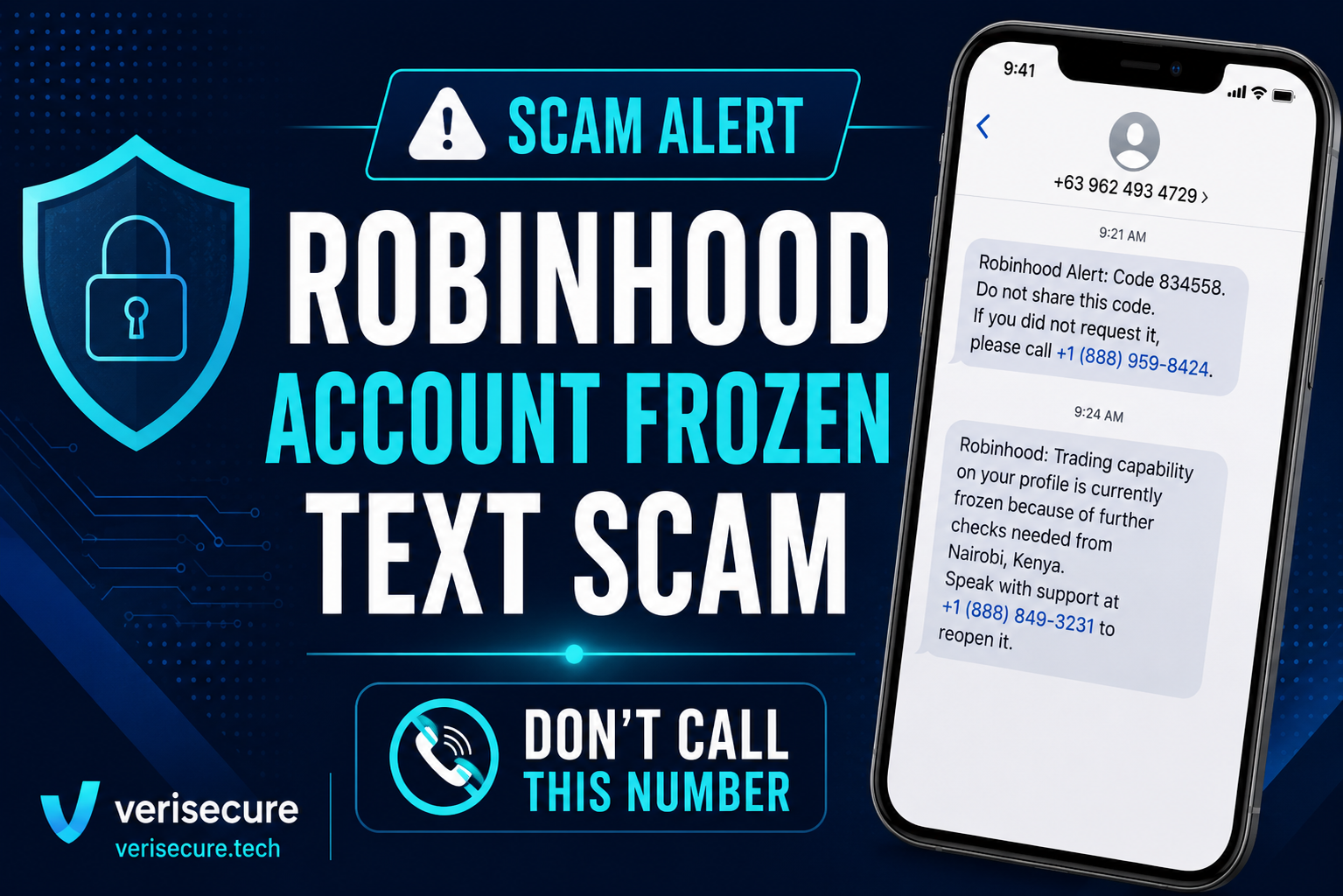
This message claimed to be from Robinhood and said trading capability was frozen because of further checks needed from Nairobi, Kenya.
The Text Messages I Received
First message:
Robinhood Alert: Code 834558. Do not share this code. If you did not request it, please call +1 (888) 959-8424.
A few minutes later:
Robinhood: Trading capability on your profile is currently frozen because of further checks needed from Nairobi, Kenya. Speak with support at +1 (888) 849-3231 to reopen it.
At first glance, this looks scary. That is the point.
The scam is designed to make you panic, call the number, and possibly hand over the verification code or account information.
Why This Is a Scam
This is most likely a smishing scam, which means phishing through text message.
The scammer may be trying to log in to your Robinhood account. When a real verification code gets sent to your phone, they quickly follow up with another fake warning message.
The second message makes it sound like your account is frozen because of suspicious activity in another country.
That fear is the trap.
Important Reminder
Verification codes are like temporary passwords. Never share them with anyone who calls, texts, or emails you.
What Makes This Scam Convincing
The timing is what makes this one dangerous.
The verification code arrives first, which makes the situation feel real. Then, only a few minutes later, the second text claims your account is frozen and tells you to call support.
That is not random. That is the setup.
The Trap Is Not Always a Link
Some scam texts do not include links at all. Instead, the trap is the phone number.
If the message tells you to call a number from the text, slow down. Go to the official app or website yourself instead.
Why the Verification Code Came First
This is what makes the scam feel convincing.
You may receive a real verification code because someone is attempting to log in using your information. Then the scammer sends a follow-up text telling you to call “support.”
Once you call, they may ask for the code to “verify your identity.”
Do not give it to them.
That code is not for verifying you. It may be what they need to finish logging in as you.
Red Flags in This Text
- The message came from +63 962 493 4729, which is not an official Robinhood support number.
- The text creates panic by saying your trading capability is frozen.
- It mentions Nairobi, Kenya to scare you.
- It tells you to call a number from the text.
- It uses urgency so you act before thinking.
- It involves a verification code, which should never be shared.
- The word “Robinhood” may use lookalike characters instead of normal letters.
Would a Phishing Detector Flag This?
It should, but basic tools may miss it if they are too focused on links.
This message has multiple warning signs even though it does not include a clickable link.
- It claims the account is frozen.
- It asks the reader to call a phone number from the text.
- It creates urgency and panic.
- It came from an unfamiliar international number.
- It mentions suspicious activity from another country.
- It uses “support” language to sound official.
One red flag is enough to slow down. This message has several.
Not sure about a message you received? Paste it into the free VeriSecure phishing detector before you click, call, or reply.
What To Do Instead
- Do not call the number in the text.
- Do not reply.
- Do not share the verification code.
- Open the Robinhood app directly.
- Check your account activity.
- Change your password if you are worried.
- Make sure two-factor authentication is turned on.
- Report the text as spam.
- Block the sender.
Printable Scam Message Checklist
Use this anytime you receive a suspicious text, verification code, account warning, delivery notice, bank alert, or “support” message.
Open the Printable ChecklistIf You Already Called the Number
If you called but did not share anything, you are probably okay.
If you shared a verification code, password, personal information, or banking information, take action right away.
- Change your Robinhood password.
- Sign out of all active sessions if possible.
- Review your account activity.
- Contact Robinhood through the official app or website.
- Monitor your linked bank account.
- Watch for more scam calls or texts.
How They May Have Gotten Your Number
Receiving this text does not automatically mean your Robinhood account was hacked.
Scammers may get phone numbers from data breaches, public records, old scam lists, social media, or random mass texting.
They send these messages to large groups of people hoping someone panics and responds.
Quick Scam Checklist
This is probably a scam if the message:
- Claims your account is frozen
- Tells you to call a number in the text
- Creates fear or urgency
- Mentions suspicious activity from another country
- Asks for or involves a verification code
- Comes from a strange number
- Pressures you to act immediately
Bottom Line
Never call a phone number from a random security alert text.
Go directly to the official app or website instead.
If someone asks you for a verification code, assume they are trying to get into your account.
Scam Number Mentioned
+63 962 493 4729
Related Resources
FAQ
Is this Robinhood text real?
It is highly suspicious. The message uses account-freeze language, asks you to call a number from the text, and came from an unfamiliar international number. Verify through the official Robinhood app instead.
Should I call the number in the text?
No. Do not call phone numbers from suspicious security texts. Open the official app or website yourself and use support options from there.
What if I shared the verification code?
Change your password immediately, check account activity, sign out of active sessions if possible, and contact Robinhood through the official app or website.
Why did I get a code if I did not request it?
Someone may have been trying to log in using your information, or the message may be part of a scam designed to make you panic. Either way, do not share the code.
Help Someone Avoid This Scam
Scam texts like this work because they create panic. If you know someone who uses Robinhood or invests online, share this article with them before they receive the same message.
A 30-second share could save someone from handing over their account.
Free Printable
Scam Message Safety Checklist
Before you click, call, reply, or share a verification code, use this printable checklist to slow down, spot red flags, and verify safely.
Open the Printable Checklist
Leave a Reply