What Is Baiting in Cybersecurity?
The scam that relies on curiosity, free stuff, and people thinking, “I’ll just check real quick.”
VeriSecure Beginner Cyber Basics
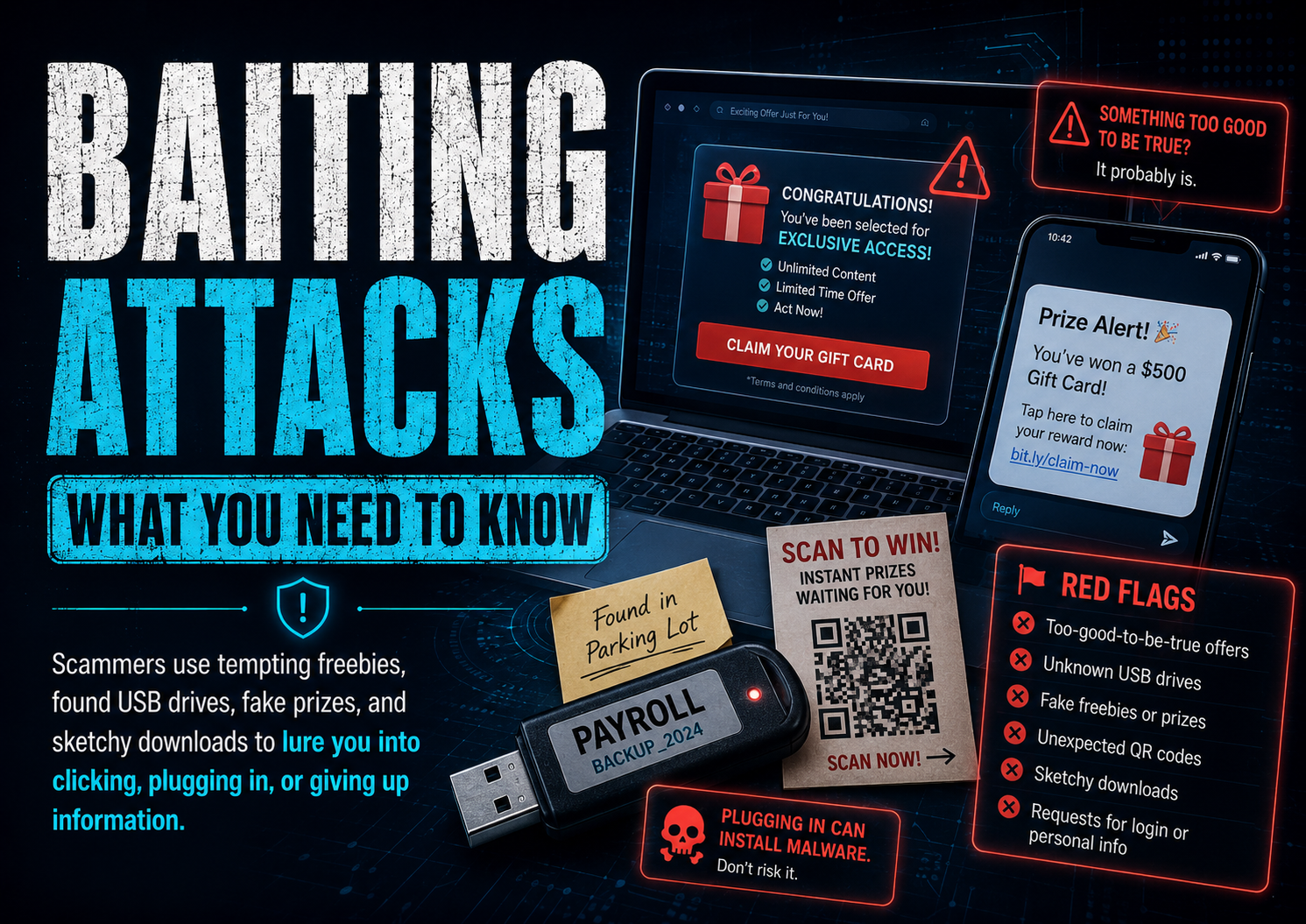
You are walking through a parking lot and see a USB drive on the ground.
It has a label on it: Payroll.
Now your brain starts doing what brains do: “Whose is this? Is there something important on it? Should I check?”
That little moment of curiosity is exactly what scammers are counting on.
Not every cyberattack starts with a hoodie-wearing hacker typing dramatic nonsense in a dark room. Sometimes it starts with something small, tempting, convenient, or free.
That is called baiting.
What Is Baiting?
Baiting is a type of social engineering attack where a scammer leaves, sends, or offers something tempting so you interact with it.
The bait might be:
- a USB drive left in public
- a fake QR code
- a “free gift card” link
- a fake giveaway
- a public charging cord
- a message saying you won something
- a file that looks private, urgent, or interesting
The goal is usually to get you to click, plug in, scan, download, log in, or hand over information.
It works because scammers are not just attacking devices. They are poking at human behavior: curiosity, urgency, fear, excitement, and the magical power of the word “free.”
Common Examples of Baiting
1. USB Drives Left in Public
This is the classic baiting example.
Someone leaves a flash drive in a place where a curious person might find it:
- parking lot
- school
- library
- office hallway
- coffee shop
- near a business entrance
The label might say something like:
- Payroll
- Private Photos
- Confidential
- Staff Bonuses
- Student Records
- Layoff List
Subtle? No. Effective? Unfortunately, yes.
The scammer wants someone to plug it in “just to see what is on it.” That one decision can expose the device to malware, stolen files, password theft, or unauthorized access.
What to do instead: Do not plug in random USB devices. Not into your laptop. Not into your work computer. Not into “the old computer you do not care about.” That is how the problem gets invited inside and offered snacks.
Workplace note: If you find a suspicious USB drive at work, do not plug it in and do not just toss it in the trash. Turn it in to your IT or security team so they can investigate and warn others if needed.
2. Fake QR Codes
QR codes are everywhere now: restaurants, parking meters, flyers, ads, packages, event signs, gas stations, and payment screens.
That convenience is exactly why scammers like them.
A fake QR code can send you to:
- a fake login page
- a fake payment page
- a malware download
- a scam giveaway
- a page asking for personal information
Sometimes scammers place a fake sticker over a real QR code. So yes, even the parking meter has entered its villain era.
This type of scam is often called quishing, which means QR code phishing.
What to do instead: Before scanning, look for sticker overlays, weird placement, misspelled URLs, or anything that feels off. After scanning, check the web address before entering passwords, payment details, or personal information.
If the QR code takes you to a login page you were not expecting, stop. Go to the company’s website yourself instead of trusting the code.
3. Fake Giveaways and “Free” Offers
Scammers know people love free things.
Common bait includes:
- Claim your free gift card
- You won an iPhone
- Free game currency
- Free Robux
- Free vacation giveaway
- Free sample — just pay shipping
- Limited-time reward
These scams often target kids, teens, older adults, and busy people scrolling too fast.
The goal is usually to steal logins, collect personal information, trick someone into entering card details, or get them to download something unsafe.
What to do instead: If the offer is random, urgent, and weirdly generous, slow down. Search for the company yourself. Do not enter passwords or payment details from a link that came out of nowhere.
Free is not always free. Sometimes it is just the scammer’s favorite wrapping paper.
4. Public USB Charging Stations and Random Cables
Public USB charging ports are not automatically evil, but they are not worth trusting blindly either.
The safer move is to avoid random USB data connections when you can.
Use:
- your own charging brick
- a wall outlet
- a portable battery pack
- a charge-only cable or USB data blocker if you travel often
What to do instead: Do not plug your phone into random cables handed to you by strangers, left in public areas, or attached to unknown charging stations.
Your phone does not need mystery electricity with side effects.
Small Educational Note: Why Baiting Works
Baiting works because it does not start by asking you to “be hacked.”
It starts by making something look useful, urgent, private, exciting, or harmless.
A USB labeled “Payroll” makes people curious. A QR code at a parking meter feels normal. A free giveaway feels exciting. A charger at the airport feels convenient.
That is the trick. The bait is designed to make your guard drop before your common sense has a chance to clock in.
Who Gets Targeted?
Baiting can target anyone.
But scammers often aim at people they think may be more likely to click, scan, plug in, or trust something that looks official.
That can include:
- kids and teens
- older adults
- students
- employees
- busy parents
- people rushing through errands
- anyone distracted, tired, or under pressure
This is not about blaming people for being curious. Curiosity is normal. Scammers just know how to weaponize it because apparently regular crime was not annoying enough.
Warning Signs to Watch For
Pause if something:
- feels too good to be true
- creates urgency
- asks for passwords unexpectedly
- asks for payment right away
- promises free rewards
- comes from an unknown source
- uses fear, excitement, or pressure
- appears random, misplaced, or suspicious
- tries to make you act before thinking
A few seconds of hesitation can save you from hours, days, or weeks of cleanup. And yes, that is annoying. But so is losing an account because a fake QR code wore a convincing little costume.
Simple Safety Tips
Never Plug in Random USB Devices
- Do not plug in found flash drives.
- Do not test them “just to see.”
- At work, school, or a business, report suspicious drives to staff, IT, or security.
Be Careful Scanning QR Codes
- Check for sticker overlays.
- Look at the web address before entering information.
- Do not log in after scanning a random code.
- When in doubt, go to the company’s website yourself.
Do Not Trust Random “Free” Offers
- Be skeptical of free money, electronics, game items, or gift cards.
- Do not enter payment details just to “claim” a prize.
- Teach kids to ask before clicking giveaway links.
- Help older relatives slow down and verify before trusting anything official-looking.
Use Your Own Charger When You Can
- Use a wall outlet and your own charging brick.
- Carry a portable battery pack.
- Avoid random public USB cables.
- Do not tap “Trust This Computer” unless you truly trust the device you connected to.
Software Helps, But It Is Not Magic
Good security software can help flag suspicious files, bad links, or malware.
But it should not be your only defense.
Do this too:
- Keep your device updated.
- Keep your browser updated.
- Use antivirus or anti-malware protection.
- Do not ignore security warnings.
- Do not test suspicious files, links, or QR codes “just to see what happens.”
Security software is a safety net. It is not permission to juggle knives because there is a first-aid kit nearby.
What to Do If You Already Took the Bait
First: do not panic.
Second: do not ignore it and hope the problem gets bored and leaves. That is not a plan. That is denial with Wi-Fi.
Do this based on what happened:
- If you plugged in a random USB drive: remove the USB drive, disconnect from the internet, and run a full security scan.
- If this happened on a work or school device: report it to IT or security immediately. Do not try to “fix it quietly.”
- If you scanned a suspicious QR code: close the page. Do not enter passwords, payment details, or personal information.
- If you entered a password: change that password from a different trusted device and turn on MFA.
- If you reused that password anywhere else: change it on every account where you used it.
- If you entered banking or card information: contact your bank or card provider right away.
- If you downloaded a file: do not open it. Delete it and run a malware scan.
- If accounts start acting weird: sign out of active sessions, change passwords, enable MFA, and review recovery email/phone settings.
If you are not sure what happened, ask for help sooner rather than later. Small problems are easier to fix before they turn into a whole digital cleanup circus.
Quick Baiting Safety Checklist
- Do not plug in random USB drives.
- Report suspicious USB drives at work, school, or public locations.
- Check QR codes before entering information.
- Avoid login pages opened from random QR codes.
- Do not trust surprise giveaways or free reward links.
- Use your own charging brick or portable battery pack.
- Keep your device, browser, and security software updated.
- Teach kids to ask before clicking, scanning, or downloading.
- Help older relatives slow down and verify before acting.
- If you already interacted with something suspicious, act quickly and change passwords from a trusted device.
The Takeaway
Baiting scams work because they target curiosity, convenience, excitement, and urgency.
That does not mean people are careless. It means scammers design traps around normal human behavior.
Whether it is a USB drive, QR code, fake giveaway, suspicious link, or random charging cable, pause before you interact with it.
If something is trying hard to make you curious, excited, rushed, or careless, stop. That pause is the protection scammers are hoping you skip.